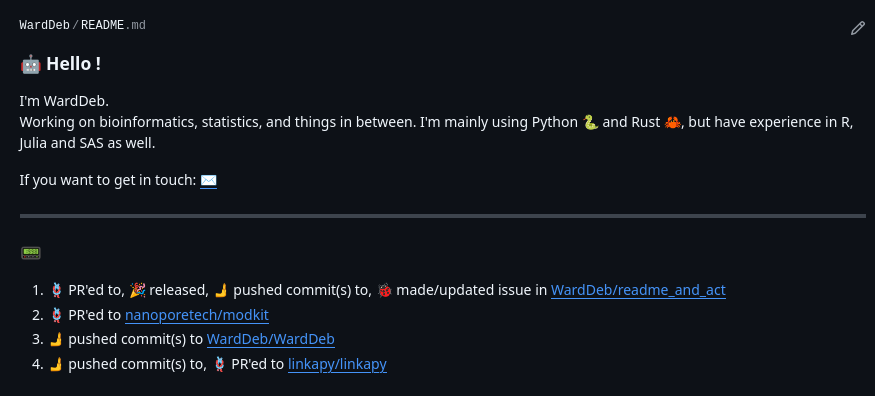
Github's personal-public profile page
Most Github users will know that your github.com/<username>/<username> repository is special, in the sense that its README.md file is rendered on your profile page. It's thus a convenient way to customize your profile, aside from the standard pinned repositories, contribution graph and contribution activity. I've only recently started playing around with this README.md file, and since this is part of a repository, github actions can be used to periodically update this file. Some people take this to the extreme, and if you have a couple minutes to waste you can stroll through a curated list of fancy profiles. I don't want to go that far, but wanted to have a small whois section (which can be static), and a latest public work section (which is periodically updated, automatically).
Github actions to the rescue
Looking around a bit on the github actions marketplace, I found a repository that does exactly what I want. Github-activity-readme requires you to have a section defined in your README.md file, and can subsequently be set up with a simple cron-scheduled action. Simple enough to set up, and I've been using it for a couple of months ever since. It was working well, but I noticed two things that grinded my gears:
- Every so often, events would be
undefined - Every valid activity would be added as a new line item, which could result in 5 lines of
opened issue in repo X,committed to repo X,opened pull request in repo X, etc. Ideally those events would be grouped per repository.
At that time I've explored two options. I looked for an alternative action, and initially thought I found one with recent-github-activity-profile-readme, which was based on the first action and claimed additional features. Ironically however, this action seemed to be abandoned (which is the way it is with open source projects). The second option was to fork and try to update the original action to my needs. In the mean time, my first crux already got fixed (wich is the way it is with open source projects), so only the second one remained. Can't be that hard, right ? I opened the actual repository, saw 20k+ lines of javascript code, and promptly closed the tab. I never tried javascript before, but do remember a number of reasons why I shouldn't. So I let it be for this time.
Enter readme-and-act
Not willing to give up, I figured I could try and reproduce the functionality in Python, since I'm more familiar with it and the actual work to be done is not complex at all. The results, which I coined readme-and-act (raa), is an action that collects, collates and updates a README.md file in your repository. Since I liked how simple setting up 'Github-activity-readme' was, I tried to keep the same setup for ease of use. This means that your README.md file needs to have a section where the content will be inserted. Secondly, the action needs a GH_TOKEN, which is automatically available within a github action runner.
As for the setup, I've only included the (excellent) PyGithub package, and Pydantic. In theory raa could go without Pydantic, but incorporating this repo in my day-to-day was on my to-do list for a while, so I figured why not try it now.
The code works around a 'updateReadme' class. Upon initialization, a logger is set up, the github-related variables are defined (i.e. username, GH_TOKEN if provided, how many events/lines should be reported and so on) and the actual file to make the changes in is set. This file is also validated to be present and contain the section markers. After initialization, three separate instance methods do the actual work.
- fetch_activity: get latest public events through Github API.
- construct_readme_section: collate events per repository (aforementioned crux #2).
- update_file: actually change the README.md file, and push the changes back to the repository.
That's it ! The only additional code is a small main.py function that allows the code to be run via CLI as well (for testing purposes). Not counting this, the entire functionality fits in 205 lines of code (33 of which are hardcoded config dictionaries which should move to a separate toml file at some point). The action itself is just defined in a separate action.yml file (which mainly defines the variables, and points to a Dockerfile which just runs the actual python command).
Taken together, it was a fun exercise to get more familiar with 'my own' github action, but more importantly I dabbled around a bit with Pydantic. At first this seemed quite daunting, but setting up a BaseModel and actually testing a bit was very easy. I'm eager to update existing tools in my day-to-day work as I (very often) have to painstakingly debug poorly defined data structures as they pass through multiple functions. Can't wait to try this out in the wild.
In the end, the rendered README now looks like this: